Saturday, August 15, 2015

windows 7 disk clean up without any softwer

Perhaps in your own computer there are many unnecessary file saved like LOCAL DISK HARD DISK But you don't know in that  time Disk cleanup  is very important to do. Now how to do  disk clean up .There are some rule just follow it.
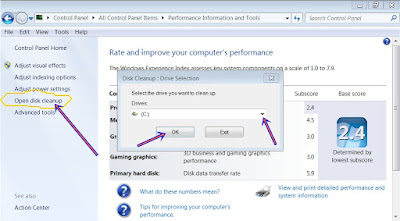
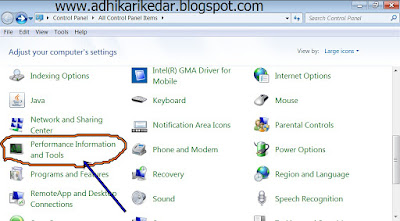
1. First of all click on START / CONTROL PANEL /हुँदै Perfomance Information And Tools and open it  २. Now in opened file from right side click on  Open disk cleanup After clicking pop up  window will appears. Now click on  drop down and  choose which disk you want to clean choose one and than clean on  OK.


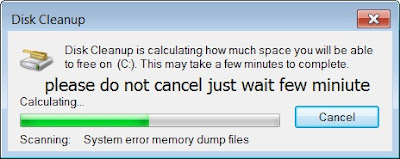
3. After clicking  OK wait for some time because free file is calculating so wait for a moment.


4.Now the calculated new file will open and opened file will highlighted at the top and see there is two options Disk clean up and More option from two option click on Disk clean up and  now select the unnecessary file which you want to remove or delete and after that click on OK and then Delete files.
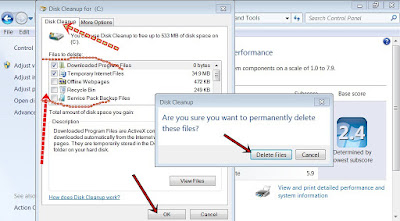


5. Now your unnecessary file is deleting .Thank you.
+

How to create new document ms office excel

Microsoft Excel is one of the most popular spreadsheet applications that helps you
manage data, create visually persuasive charts, and thought‐provoking graphs. Excel
is supported by both Mac and PC platforms. Microsoft Excel can also be used to
balance a checkbook, create an expense report, build formulas, and edit them.

OPENING MICROSOFT EXCEL ON A PC

1. To begin Microsoft Excel, Go to Start > All Programs > Applications > Microsoft
Office > Microsoft Excel

2. When opened a new spreadsheet will pop up
on the screen, if this does not happen click on the Office Icon > New. From here
a dialog box with various different templates will appear on the screen that you can
choose from. Once a template is chosen, click Create.


+

How to customize taskbar and start menu?

Do you want to keep Taskbar and Start Menu in your own design.From this you can able to put your Desktop taskbar from right to left and up and down any where you want and also you can able to change the size of the taskbar.Not only this you can also able to hide the taskbar and when you put mouse cursor than it will automatically appears. Now lest follow this steps to do this.


1.First of all Click on Start icon and Search Taskbar or right click on desktop and click on properties and open for example see below picture.


2.After opening that now start your work see I have putted my taskbar at the top of the
Desktop


3. After customizing Taskbar and Start Menu click on apply and then OK.
+

Windows shortcut key


Alt+F = File menu option in current program.
Alt+E = Adit options in current program.
F1 = Universal help in almost every windows program.
Ctrl+A = Select all text.
Ctrl+X = Cut selected item.
Ctrl+C = Copy selected item.
Ctrl+V = Paste.
Ctrl+Home = Goes to begining of document.
Home = Goes to begining of current line.
End = Goes to end of current line.
Ctrl+End = Goes to end of document.
Shift+Home = Highlight from current position to begining of line.
Shift+End = Highlight from current position to end of line.
Win+R = Run.
Ctrl+S = Save.
Alt+R = Print.
Win+E = Open windows explorer.
F5 = Refresh.
Ctrl+F = Open find text search bar.
Esc = Stop.
Alt+C = View favorites, feed, and history.
Alt+Enter = Search a new tab.
Alt+Left = Back to manage posts.
Ctrl+T = New tab.
Windows = Open a windows program.
Alt+J = Feed provide Updated website content.
Alt+L = Help.
Ctrl+W = Close tab.
Ctrl+Q = Quick tab.

F11 = Page full screen.
Win+
M = Minimize the all tab..Ctrl+j = View downloads.
Alt+X = Open tools.
Win+P = Project.
Win+T = Show minimize page  internet browser.
Win+U = Ease of access center.
Left alt+shift+num lock = Use mouse key.Win+T+Enter = Open windows internet explorer.
+

How to create a Shortcut icon of shutdown?

Do you want to keep a shortcut shutdown button  in your desktop if you want to keep than just follow simple tips given below.
1.First of all right click on desktop and click on new option and then in shortcut.

2.After clicking on Shortcut new window will appear in the free space type C:\Windows\System32\shutdown.exe -s -t 00 and click on Next.
3. After next button another window will open now there type the name as you like if you don't want to right its OK after that click on finish button now you can able to turn off your computer. If you want to shutdown you just have to double click on shortcut icon.
+

Auto scrolling news ticker for blogger

The Auto scrolling news ticker gadget is realy nice using for blogger because when you'll updates last post till date they are all or you have choosed post amount will be showing automatic with recent post style by marquee for example view this Demo so if you like this gadget learn from below tips how to  insert to your blog

1. Open your blog account
2. Choose gadget and click on "Add a Gadget"  inside Layout from left corner

3. Find "HTML/Javascript" and click on that options then will be open there a empty HTML box
4. Copy the red color whole code from below and paste it there in empty HTML box
<script type='text/javascript'>
var kdrWidth="100";
var kdrScrollAmount="0.5";
var kdrScrollDelay="100";
var kdrDirection="left";
var kdrtargetlink="no";
var kdrnumPosts="10";
var kdrBulletchar ="►►";
var kdrimagebullet="no";
var kdrimgurl="https://blogger.googleusercontent.com/img/b/R29vZ2xl/AVvXsEi8zmGhAPnpMVC883Lv1IWsvl5a_c5hjLAq9eQ3F51ZdZO67lKwIgF44tT7q3DUfz3h8Kk0GXmOHz-K2Nw8ouK-sJKfDm2CcC4PfcRKDjlsbEcPHcPB7Kfg8PtkDtvfBGbm8elPzpSXLaG3/w25-h23-no/";
var kdrfontsize="14";
var kdrbgcolor="transparent";
var kdrlinkcolor="333333";
var kdrlinkhovercolor="3366CC";
</script><br />
<script type='text/javascript' src='https://adhikari-kedar.googlecode.com/svn/OnlineComputerInstitute-rpscroller-v3.js' ></script><br />
<script type='text/javascript' src="http://adhikarikedar.blogspot.com/feeds/posts/default?alt=json-in-script&callback=kdrAdvRecentPostsScrollerv3&max-results=10"></script>

5. Now replace it adhikarikedar as your blog link name and save it
6. Now go to your blog and refresh one more you will see there.
+

jquery Scroll back to top widget for blogger

This toturial is i will show you how to add jquery smooth scroll back to top button for blogger you can go direct top from blogger footer lets go see how to aad this gadget to your blog the gadget is designed with only text not by image you can see screenshot on below


1. Go to your blog account and sign in there with your email and password
2. Now go to this location "Dashboard > Templates > Edit HTML"
3. Search for </body> tag
4. Add below code just before </body> tag
<style type='text/css'>
#MBB {-moz-border-radius: 5px;-webkit-border-radius: 5px;border-radius: 5px; width:96px;background-color: #EEEEEE;background-color:#FFD45D;filter: progid:DXImageTransform.Microsoft.gradient(startColorStr=&#39;#99EEEEEE&#39;,EndColorStr=&#39;#99EEEEEE&#39;);text-align:center;padding:5px;position:fixed;bottom:51px;right:29px;cursor:pointer;color:#111;text-decoration:none;border:1px solid #C9C9C9;}
</style>
<script src='https://kedar-adhikari.googlecode.com/svn/scroll_Top.js' type='text/javascript'/>
<script type='text/javascript'>
$(function() {
    $.fn.scrollToTop = function() {
    $(this).hide().removeAttr(&quot;href&quot;);
    if ($(window).scrollTop() != &quot;0&quot;) {
        $(this).fadeIn(&quot;slow&quot;)
    }
    var scrollDiv = $(this);
    $(window).scroll(function() {
        if ($(window).scrollTop() == &quot;0&quot;) {
        $(scrollDiv).fadeOut(&quot;slow&quot;)
        } else {
        $(scrollDiv).fadeIn(&quot;slow&quot;)
        }
    });
    $(this).click(function() {
        $(&quot;html, body&quot;).animate({
        scrollTop: 0
        }, &quot;slow&quot;)
    })
    }
});
$(function() {
    $(&quot;#MBB&quot;).scrollToTop();
});
</script>
<a href='#' id='MBB' style='display:none;'>Scroll to Top </a>


5. Now save your templates and you are has been successfully done !
+